


Body Temperature・Fever Tracker
2.4161.00 Reviews
App Specs
- Version
- 4.2.4
- Updated On
- License
- Free
- Downloads
- 1,000,000+
- Developer
- Firehawk
- Categories
- Medical
- Platform
- Android, iOS
Screenshots
 Analysis by AppCompare
When someone in the house feels unwell, the hard part is often not taking a single temperature reading; it is remembering what happened before and describing the pattern clearly later. Body Temperature・Fever Tracker is a medical app by Firehawk built around keeping those notes together. I see its strongest use as a simple record-keeping companion, not as a thermometer or a way to decide on its own whether someone needs medical care.
Where a useful record can get awkward
A tracker is only as helpful as the entries you make. If a reading is saved without its time, the symptoms happening around it, or the person it belongs to, the history may be less useful when you look back. I would enter a measurement soon after taking it and add a short note while the details are fresh, rather than trying to reconstruct the day from memory at bedtime.
This matters especially when several people are ill at once. A family member can have a different pattern from another, and a string of numbers without clear ownership can become confusing quickly. The app’s multiple-profile approach is useful here, but it still depends on choosing the right profile before recording. I’d make that the first check in a shared-household routine.
It is also worth keeping the role of the app in perspective. A chart can make changes easier to see, but it cannot validate the thermometer, explain the cause of a symptom, or replace medical advice. I would use the record to support a conversation with a clinician, not to postpone one when someone’s condition is worrying.
Setup checks that prevent messy tracking
Before relying on reminders, I would decide who is doing the logging and what a useful routine looks like. For example, one person can take responsibility for entering readings for a child, while another can review the record later. A consistent routine is more valuable than setting frequent nudges that everyone dismisses.
When creating profiles, keep their details distinct and check the selected name before saving an entry. If a reading appears under the wrong person, correct the record while you still remember which measurement it was. This small habit is easier than untangling several similar entries later, especially when family members are sharing care.
For the first few entries, I’d also check that the recorded value and accompanying symptom note make sense before moving on. This is not about turning logging into a chore; it is a quick way to catch a missed digit, a mistaken profile, or a note that is too vague to be useful. A short description such as “chills before rest” gives more context than a bare label.
Worth Reading Before You Choose

Switching to Android Auto Means Rethinking Your Driving Routine

Google Calendar Makes a Crowded Week Easier to Manage

Baby Panda World Brings Quick Play to Modern Phones, but Its Game Library Feels Busy

ESPN’s Live Game View Makes Following Close Games Easier

QuizzLand Review: A Good Fit for Short Trivia Breaks, Not Every Player

Basketball Stars: Multiplayer Is Fast, but Can It Recover When Matches Go Wrong?
Recovering a routine when it breaks
Illness rarely follows a tidy schedule, so missed reminders are normal. If you forget an entry, I would not guess at the temperature or make up a time to fill the gap. Start again with the next actual measurement, and add a brief note if the break in the record is important. An honest gap is better than a neat-looking history that contains invented detail.
If you cannot find an entry where expected, first check the active profile and review the nearby records before entering it again. Duplicate readings can make a trend harder to interpret. If the app is not behaving as expected, closing and reopening it and checking that you are using the current version are sensible basic steps; avoid deleting stored information just to troubleshoot unless you understand what that action will remove.
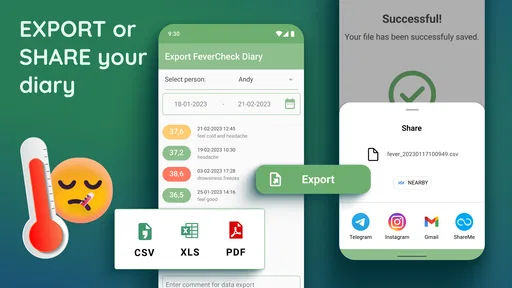
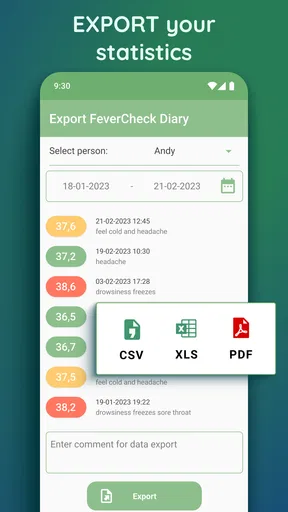
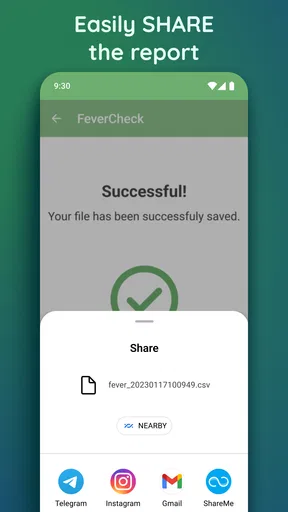
For a doctor visit, I would review the record beforehand and pick out the readings and symptoms that best explain the timeline. That is more practical than scrolling through every entry during an appointment. If the app offers an export or backup option in your version, those tools may help with keeping or sharing your record, but I would check the result before relying on it and avoid sending sensitive health details casually.
When the problem is not the app
A temperature entry can look unusual because of the measurement itself, the timing, or the circumstances—not necessarily because the app has changed anything. I would follow the instructions for the thermometer being used and record readings consistently. If two measurements seem inconsistent, taking another measurement according to the thermometer’s guidance is more useful than treating the chart as proof that one value is correct.
Likewise, a reminder that does not appear may be affected by the phone’s notification settings or by a busy day, rather than by the health record itself. Check that reminders are enabled in the app and that the phone allows its notifications. If alerts are becoming background noise, a less demanding schedule you can actually follow is better than a perfect schedule you continually ignore.
Most importantly, the app is not a diagnostic tool. A person’s overall condition matters alongside a number, and concerning symptoms deserve appropriate medical attention even if the logged temperature looks ordinary. I would never use a clean chart or the absence of an alert as reassurance that care is unnecessary.
Who will get the most from it
This kind of diary suits someone who wants to keep a short-term record during an illness, a caregiver coordinating notes for family members, or a person who tends to forget whether symptoms improved before or after a reading. It can also help prepare a clearer account for a healthcare professional, since dates, readings, and symptoms are easier to review together than scattered across memory or scraps of paper.
It is less suitable for anyone expecting the phone to measure body temperature, provide a diagnosis, or automatically manage a care plan. People who only need an occasional reading may find a thermometer’s own display and a simple note on paper enough. Someone already using a trusted health record system may also prefer not to maintain the same information in two places.
Compared with a paper notebook, an app can make entries easier to review as a chart and keep several profiles more organized. Paper, on the other hand, does not depend on a phone or app routine. Compared with a general notes app, a dedicated fever diary gives the tracking task a more focused place, though a notes app may be more flexible for someone who wants to record many kinds of health information in one timeline.
Getting Started with the App
First off, downloading Body Temperature・Fever Tracker was a breeze. It's available on both Android and iOS, so no worries about compatibility issues. Once installed, the app greets you with a clean and user-friendly interface. Setting it up is as simple as pie. You start by entering your basic info—think name, age, and any underlying conditions that might affect your body temperature. The app makes you feel like it already knows you, and that’s a plus in my book.
Features That Stand Out
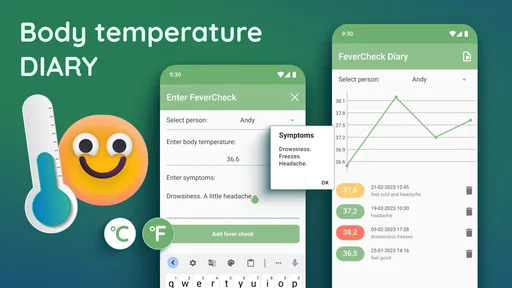
Now, onto the juicy bits—the features! This app isn’t just about recording your temperature; it's a whole lot more. It allows you to log your temperature readings, keeping a neat history that you can refer back to any time. This feature is particularly handy if you’re someone who tends to forget the nitty-gritty details of your health. Plus, you can add symptoms alongside each reading, which becomes like a mini health diary.
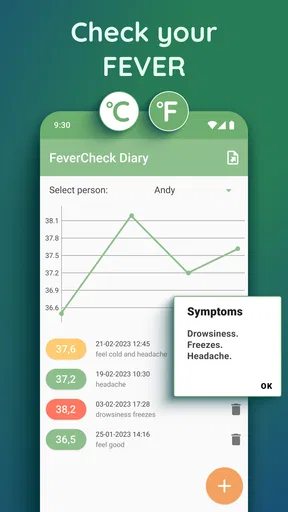
One thing I found super cool was the graphical representation of your temperature trends. The app plots your readings on a chart, making it easy to spot any unusual patterns. This visual insight can be a lifesaver, especially if you need to present accurate information to your doctor.
Keeping Tabs on Your Health
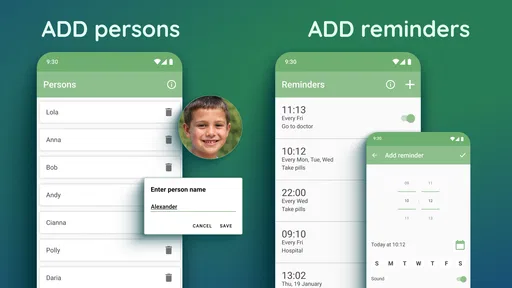
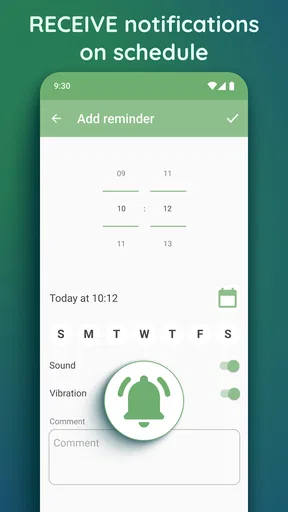
Another neat feature is the alerts and reminders system. Let’s be real, we all have a lot going on, and remembering to check your temperature isn’t always top of mind. The app sends you gentle nudges to take your readings, ensuring that you stay on top of your health game. It’s like having a little health assistant in your pocket!
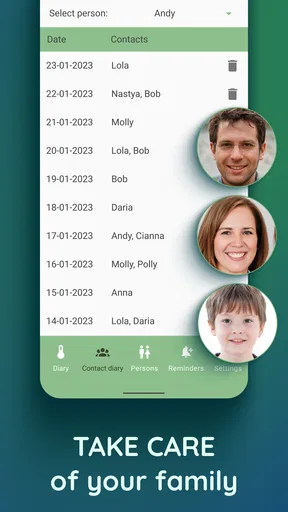
The app also supports multiple profiles, which is a blessing if you’re tracking temperatures for family members too. No more mix-ups or trying to remember who had what reading. It's these small touches that make the app feel personal and thoughtfully designed.
Privacy and Data Security
In today's digital age, privacy is a biggie, and I know many of you are probably wondering about this. The app ensures that your data is kept secure, with options to back up your data and even export it if needed. It’s reassuring to know that your information is safe and sound.
My Experience Using the App
So, what’s it like using Body Temperature・Fever Tracker on the daily? Honestly, it’s been a smooth ride. The app is snappy, and I didn’t experience any crashes or glitches. It seamlessly integrates with other health apps, making it a comprehensive tool for health monitoring. Plus, the app doesn’t bombard you with ads, which is a huge relief.
One thing I’d love to see in future updates is a bit more customization in the notification settings. While the alerts are great, having the option to tweak them a bit more would be the cherry on top.
Final Thoughts
All in all, Body Temperature・Fever Tracker is a solid app that does exactly what it promises and then some. It’s perfect for those who want to keep a closer eye on their health without the hassle of manual tracking. Whether you're a health enthusiast or someone just trying to stay on top of their wellness, this app is worth checking out. So go ahead, give it a shot, and keep your health in check with ease!
Everyday use and practical limits
A realistic use case is a parent caring for a child who feels warm in the evening. They take a temperature with a thermometer, log the actual reading under the child’s profile, note a symptom such as a sore throat, and set a reminder only if another check is part of their plan. In the morning, the chart and notes can help them explain how the night went without relying on a hazy recollection. The app organizes that account; it does not decide what care the child needs.
For an adult living alone, the benefit is different: a brief entry can preserve details that are easy to forget when tired. I would keep notes concise and factual—what was measured, when, and what symptoms were present—rather than writing a long narrative after every check. This keeps the record readable and makes the useful changes stand out.
The main trade-off is that tracking creates work. If you dislike entering information or are unlikely to maintain a routine, a dedicated app can become another task during an already unpleasant day. Its reminders may help, but they cannot make a record complete automatically. In that situation, one reliable thermometer and a simple written note may be a better fit.
Availability and value in context
The app is free to download, with in-app purchases ranging from $0.99 to $279.99 per item, so I would check the purchase screen carefully before choosing anything paid. It is rated for Everyone, has reached over a million installs, and carries an average rating of 2.5 from around 6,800 ratings. That mixed user response is a reason to try it cautiously and judge whether its specific logging workflow suits you, rather than assuming a popular download guarantees a smooth experience.
It was released on March 22, 2020, and version 4.2.4 is the current version. Android users need version 5.0 or later. Those details are useful when deciding whether an older device can run it, but they do not change the basic advice: test the routine with a few real entries before depending on the app for an important health conversation.
My practical verdict
I would choose this app when I want a dedicated place for temperature readings, symptoms, reminders, and separate family profiles, and I would treat its chart as a way to organize observations rather than interpret them medically. The most useful habit is simple: select the right person, enter only a real measurement, and add a short symptom note while it is still fresh. If that feels manageable, the diary can make a stressful stretch easier to explain later.
If you need a thermometer, automated medical guidance, or a highly configurable reminder system, this is not the right solution by itself. Keep using suitable medical care and the measuring device you trust, and use the app only for the record-keeping job it is designed to support. For that narrower purpose, it can be a convenient companion—as long as you are comfortable with the manual effort and mindful about handling personal health information.
Pros
- Easy-to-use interface for quick tracking.
- Offers detailed temperature history graphs.
- Customizable alerts for fever notifications.
- Supports multiple profiles for family use.
- Integrates seamlessly with health apps.
Cons
- Limited features in free version.
- Ads can be intrusive in the free tier.
- Occasional syncing issues reported.
- No offline data entry capability.
- Lacks advanced analytics options.
FAQs for Body Temperature・Fever Tracker
What features does the Body Temperature・Fever Tracker offer?
The Body Temperature・Fever Tracker app offers a comprehensive suite of features designed to help users monitor and manage their body temperature. It includes tracking functionalities for daily temperature recordings, a history log to observe trends, customizable alerts for fever detection, and integration with health apps for a seamless experience.
Is the Body Temperature・Fever Tracker app compatible with all devices?
The app is designed to be compatible with both Android and iOS devices. However, it is recommended to check the specific OS version requirements on the app store page to ensure compatibility with your device. Users with older devices may experience limitations or require updates to access all features.
Does the app require any additional hardware for temperature tracking?
No additional hardware is required to use the Body Temperature・Fever Tracker app. Users can manually input their temperature readings obtained from conventional thermometers. The app focuses on tracking and managing these inputs rather than directly measuring body temperature.
How secure is the data stored in the Body Temperature・Fever Tracker app?
The app prioritizes user privacy and data security by implementing encryption protocols to protect stored information. Personal data is kept confidential and is not shared with third parties without consent. Users are encouraged to review the app’s privacy policy for detailed information on data handling.
Can I share my temperature logs with healthcare professionals?
Yes, the app provides an easy way to export your temperature logs, which can be shared with healthcare professionals. This feature is particularly useful for ongoing health monitoring and consultations, allowing for informed medical advice based on detailed data collected over time.


